
Summer School calendars are required in order to create an enrollment record for students completing graduation requirements after the school year has ended but before the next school year has started. Summer School calendars can also be set up to allow for attendance, schedules, and grading populated using the NCSIS available tools. Below are directions for the minimum of creating a calendar for only graduation purposes as well as creating a calendar needed for recording data within the summer school program.
Minimum Requirements Creating New Calendars
Use the steps to below to create a calendar for recording enrollments for students completing graduation requirements and graduating after the end of the current school year.
Navigation: Scheduling & Courses > Calendar Setup > Calendar Wizard
- Select current school year for calendar attributes for new calendars
- Create New Calendars by Roll Forward Calendars with selected data - Scheduling Prep: Calendar Setup For Upcoming Year - Study Guide | Infinite Campus
- Choose Year Schoolname template
- Start Date - The first instructional day of the summer school calendar (date must be after the last instructional day of the current calendar)
- End Date - The last instructional day of the summer school calendar (date must be before the first instructional day of the future calendar)
- Select the calendar to roll forward
- Click Next


- Select the following data to copy:
- Schedule Structures
- Grade Levels

- Click Run Wizard.
- When the wizard is complete, refresh the browser to see the updated calendar in the context dropdown.
Create Full Functioning Calendars
Use the steps below to create a fully functioning calendar for summer school purposes. This calendar can be used to create enrollments, schedule courses, document attendance, and post grades.
Navigation: Scheduling & Courses > Calendar Setup > Calendar Wizard
- Select current school year for calendar attributes for new calendars
- Create New Calendars by Roll Forward Calendars with selected data - Scheduling Prep: Calendar Setup For Upcoming Year - Study Guide | Infinite Campus
- Choose Year Schoolname template
- Start Date - The first instructional day of the summer school calendar
- End Date - The last instructional day of the summer school calendar
- Select the calendar to roll forward
- Click Next
Start and end dates for the Summer School calendar may overlap with other school calendar dates; however, student enrollment dates CANNOT overlap between calendars.


- Select the following data to copy:
- Schedule Structures
- Grade Levels
- Courses (Optional) Courses can be copied to the summer school calendar, but grading tasks will need to be adjusted. This is due to the different term setup for summer school calendars. If courses are not copied during this step, course masters specific to summer school can be created and courses added later in the set up process. Existing courses can also be added to the summer school calendar and edited later in the set up process.
- Attendance Excuse Codes
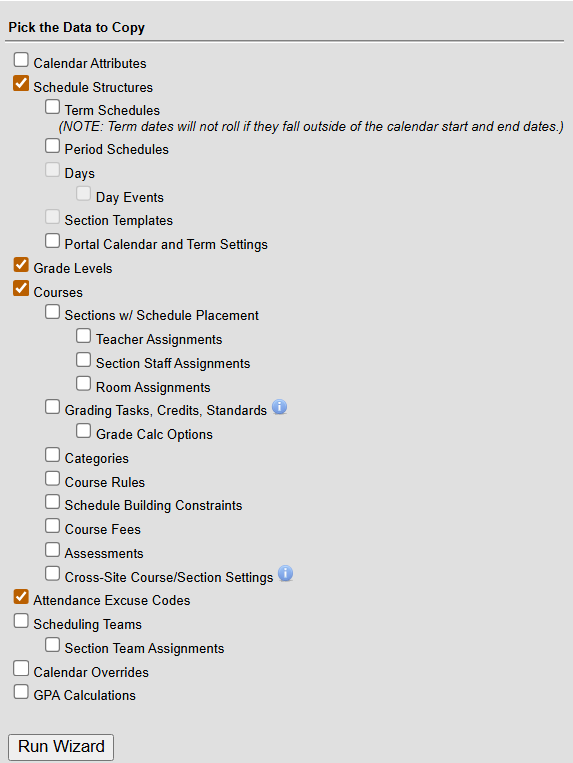
- Click Run Wizard.
- When the wizard is complete, refresh the browser to see the updated calendar in the context dropdown.

