This Data Import option is an OPTIONAL tool for importing Future Enrollment information into the current year’s enrollment line, enabling next year’s placement data to be added. If the Enrollment Roll Forward process has already been completed, there is no need to use this import.
This process deletes future enrollment records and updates the future enrollment fields in a student's current enrollment record. Future year schedules are deleted when future enrollment records are deleted.
A template has been created and is available here.
The above link will require a forced copy of a Google Sheet. The Google Sheet can be downloaded into Excel.
Based on the data in the import template, Future Enrollment information will be set on the Current Year line of enrollment in Infinite Campus. From there, the Enrollment Wizard can be used to create next year enrollments.
The future enrollment import file includes the following fields:
| studentNumber |
| NextCalendar |
| NextScheduleStructure |
| NextGrade |
| CRDCSchoolofAccountability |
| AdmissionStatus |
| Resident District |
| Resident School |
| Serving District |
| Serving School |
Including values in the above fields will update the corresponding fields on a student's current enrollment record. If a field is left blank, it will not overwrite the existing information in the student's record.
Navigation: System Settings > Data Utilities > Data Import Wizard
- Choose PSU_Future_Enrollment_Import from the Import Type drop list.
- Choose Local, then Browse and select your file.
- Click Run Import.

Following the import, a result screen will appear:
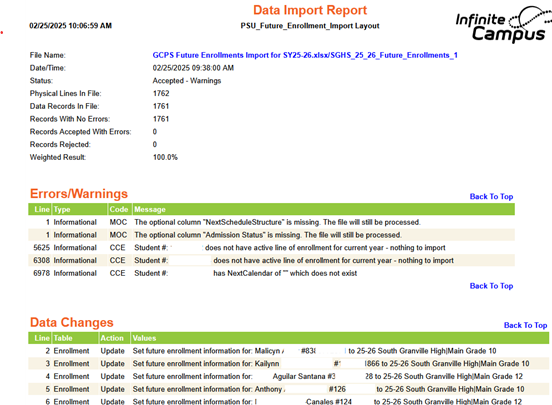
The results will show you the following things:
- Students who do not exist (no match on student #)
- NextCalendar in import does not exist in Campus
- NextScheduleStructure in import does not exist in Campus
- NextGrade in import does not exist in Campus for the next calendar
- **Student has enrollment in future year for different school – enrollment will be removed.
- Set future enrollment information
**NOTE: If student already has that next year line of enrollment and ANY information exists with it (enrollment/rosters/requests), it will be REMOVED with this process and the Future Enrollment Information will be updated to what is in the file.
Below is an example of how the future enrollment import will update a student's enrollment.
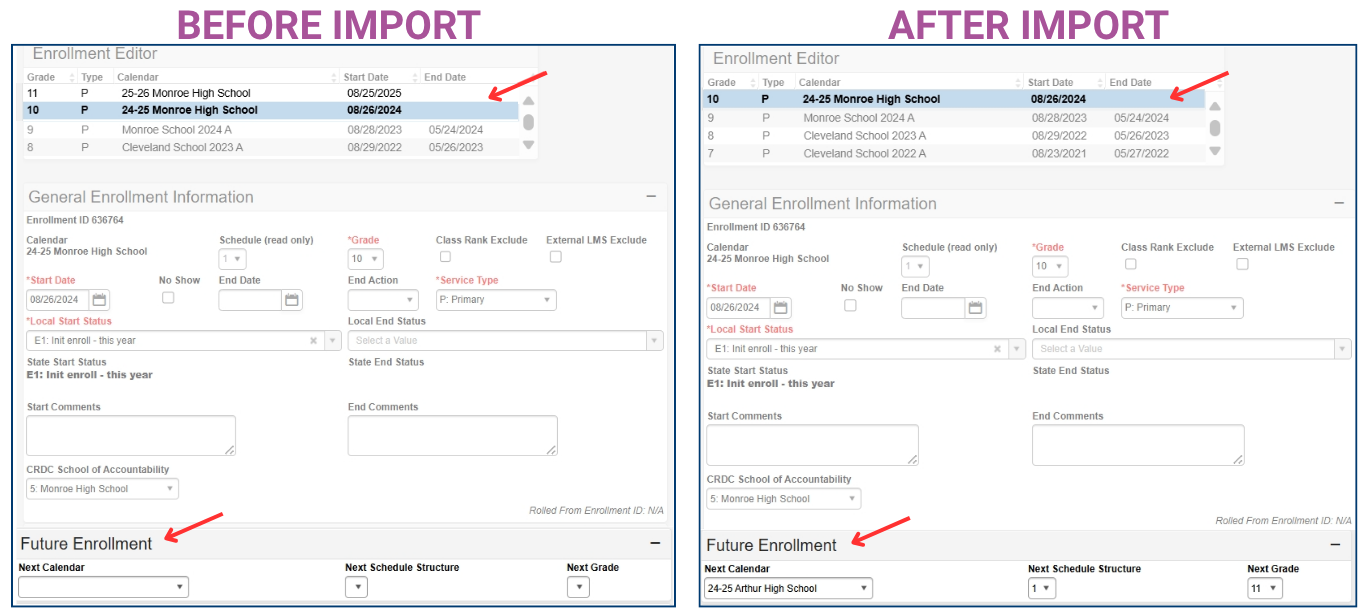
Once the future enrollment has been updated, use the Enrollment Roll Forward Wizard to roll forward student enrollments with the updated future school.




