
IMPORTANT: The UID system must be used to search for an existing UID for all entering pre-K students to avoid duplicate accounts.
All Preschool (pre-K) students (children under the age of 6 and not kindergarten age-eligible) must be enrolled in the NC Student Information System using standardized processes to ensure accurate data collection and reporting including, but not limited to, the following federal requirements:
-
the number and percentage of preschool children served by NC that are funded by Title I (ESEA),
-
the number of days/hours enrolled in a public school setting (IDEA), and
-
the significant disproportionality in identification and disciplinary actions for students ages 3 - 21 (IDEA).
Under G.S. 115C-107.3 (Child Find), PSUs must identify, locate, and evaluate all children ages 3–21 who may have disabilities. The Child Find census is taken annually and must include both children identified and suspected of having disabilities. ECATS is the program by which children are evaluated and cannot pull a student record unless the child exists in the SIS with a UID, name, date of birth, sex, and race/ethnicity.
IDEA Child Find
Compliance with IDEA and NC child find requirements includes meeting specific timelines for eligibility determination and, if eligible, the implementation of an Individualized Education Program (IEP). Additional requirements outside of the exceptional children written referral requirements may not be implemented in a way that causes delays in the child find process, violates federal and/or state policies or may be perceived as creating additional requirements for accessing the eligibility determination process and/or ensuring accurate reporting (NC 1503-2). While program or school enrollment may require specific documentation, no information beyond federally allowable child find information (child’s name, date of birth, and parent contact information) may be required to enter a child in the NCSIS for child find purposes. The request of additional items for enrollment cannot delay the process of entering a child’s record in the NCSIS for child find purposes.
IMPORTANT: The UID system must be used to search for an existing UID for all entering pre-K students to avoid duplicate accounts.
Pre-K Classrooms in NC Public Schools
All students attending a public-school setting (with a school number 300 or above) must be enrolled in the home school, including pre-K students. This includes pre-K students served through a CTE early childhood program. If the school does not have the pre-K grade in EDDIE, but has pre-K students to enroll, the pre-K grade levels must be assigned to that school in EDDIE. Public LEA and School numbers are assigned by the NCDPI Division of School Business Services. Information about requesting an LEA or School number can be found on the NCDPI website. Please refer to the Preschool Grade Levels section for further guidance.
Pre-K Centers Operated by NC Public Schools
All students attending a PSU operated pre-K center that does not have a school number above 300 must be enrolled in the school where the teacher is assigned. If that school does not have the pre-K grade in EDDIE, the pre-K grade must be added.
Others
All pre-K students in a non-public school environment (non-public school/location), and who are referred to or are receiving services, must be assigned to the “program calendar” which is delivering the service. These program calendars are located in the NCDPI school, and the calendar numbers are as follows:
-
OEC*: 292
-
LEP: 293
-
OMP: 294
-
OHP: 297
*Note that if a pre-K student is enrolled in the OEC school and another program(s), the student should be enrolled in OEC 292 calendar, and the other programs must be indicated as a program.
Demographic Information
All current enrollment fields will apply to pre-K students. The UID system must be used to search for an existing UID for all entering pre-K students to avoid duplicate accounts. This will also ensure the alignment of data collection and will provide the required race and sex data.
Follow the steps for enrollment per your PSU guidelines and using the Priority Student Entry Checklist article.
Pre-K students should be placed in the appropriate grade level based on their birth date.
Grade level is selected in the enrollment tool at the time of enrollment. If the pre-K grade levels are not displaying at the school, they must be added to the school at the Local Education Agency (LEA) Office level in EDDIE.
Important: The steps below must be performed in EDDIE, by the designated EDDIE personnel at your school or LEA. Contact your EDDIE subscribed user(s) to update EDDIE. These changes cannot be made directly in the Student Information System because the fields are locked by EDDIE.
Once the changes are completed in EDDIE, it will be automatically synced and reflected in the SIS within two days.
Edit Grade Levels in EDDIE
- Access EDDIE located under https://www.dpi.nc.gov/districts-schools/district-operations/financial-and-business-services/demographics-and-finances/eddie with your assigned EDDIE access credentials.
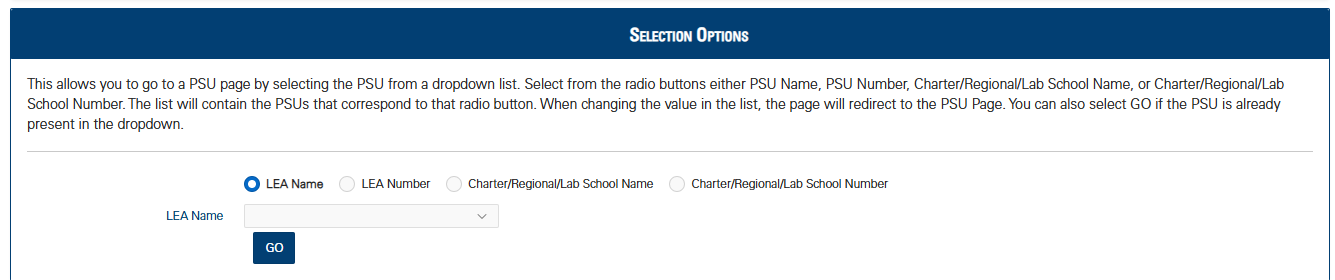
- Under selection Options, locate the school district from the LEA Name drop-down menu and click Go or press Enter.
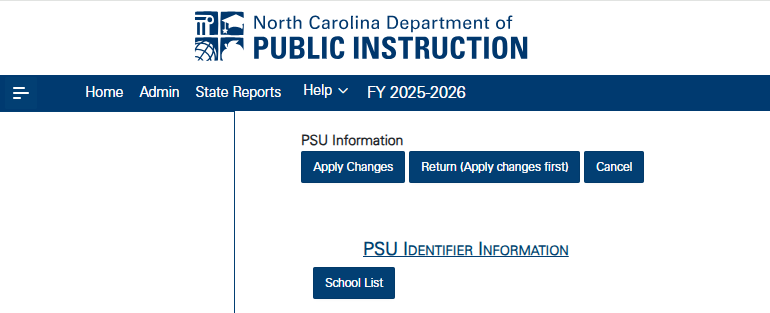
- At the PSU Identifier Information field, click School List.
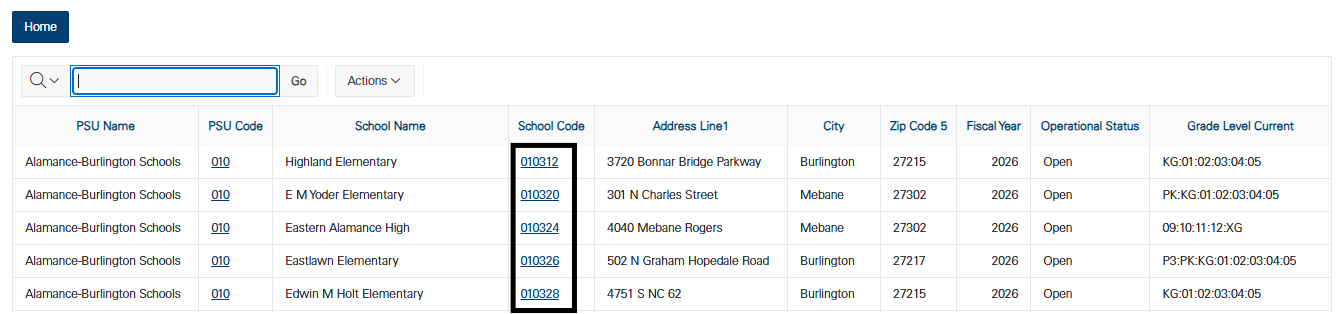
- Click the appropriate school number under the School Code column.
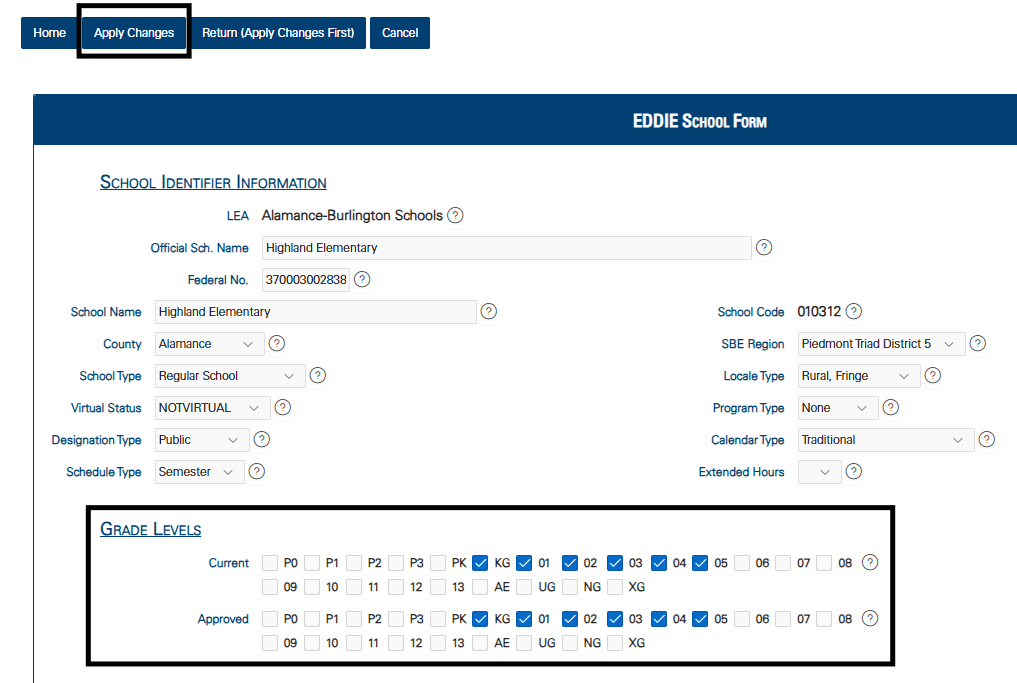
- Under Grade Levels, check the appropriate grade levels for the school and click Apply Changes. Refer to the Birth Date Ranges table listed below.
Once the changes are completed in EDDIE, it will be automatically synced and reflected in the SIS within two days.
Birth Date Ranges for Current Year - Next year for e.g.: 2025-26
| Eddie | SIS Grade Level | Student's Age | Birth Date Range | Example | |
|---|---|---|---|---|---|
| From | To | ||||
| P0 | IT | <1 | September 1st of Current Year | August 31st of Next Year | 9/1/25-8/31/26 |
| P1 | IT | 1 | Birth Date minus 1 year | Birth Date minus 1 year | 9/1/24-8/31/25 |
| P2 | IT | 2 | Birth Date minus 2 years | Birth Date minus 2 years | 9/1/23-8/31/24 |
| P3 | PR | 3 | Birth Date minus 3 years | Birth Date minus 3 years | 9/1/22-8/31/23 |
| PK | PK | 4 | Birth Date minus 4 years | Birth Date minus 4 years | 9/1/21-8/31/22 |
| KG | KG | 5 | Birth Date minus 5 years | Birth Date minus 5 years | 9/1/20-8/31/21 |
Access EDDIE at: http://apps.schools.nc.gov/eddie
All Preschool (pre-K) students (children under the age of 6 and not kindergarten age-eligible) must be enrolled in the NCSIS using standardized processes to ensure accurate data collection and reporting including, but not limited to, the following federal requirements:
the number and percentage of preschool children served by NC that are funded by Title I (ESEA),
the number of days/hours enrolled in a public school setting (IDEA), and
the significant disproportionality in identification and disciplinary actions for students ages 3 - 21 (IDEA).
In addition, these students must be enrolled into a student program in the NCSIS. Select all program types that apply. All program types providing pre-K services must be included. For example, a student’s regular education program may be the NC Pre-K program, and the child may also receive services from the EC program or dually enrolled in Title I Preschool. If all of the program types are not known for pre-K students, please contact the PSU pre-K Coordinator for assistance. Choices may include:
- NC Pre-K
- Title I
- Head Start
- Early Head Start
- Exceptional Children
- Exceptional Children Itinerant
- Childcare Subsidy
- Local Government
- Fee-Based
- CTE Preschool
More information about the Early Learning Program at Early Learning (North Carolina) | Infinite Campus.
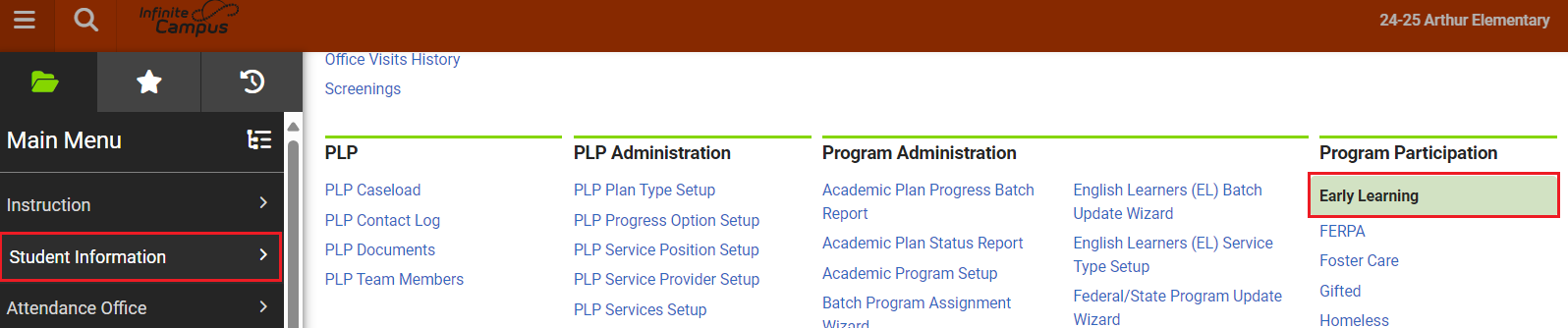
Early Learning Program Entry
Navigation: Menu > Student Information > Program Participation > Early Learning
When a student is eligible for an Early Learning program enter the student into the program using the following steps.
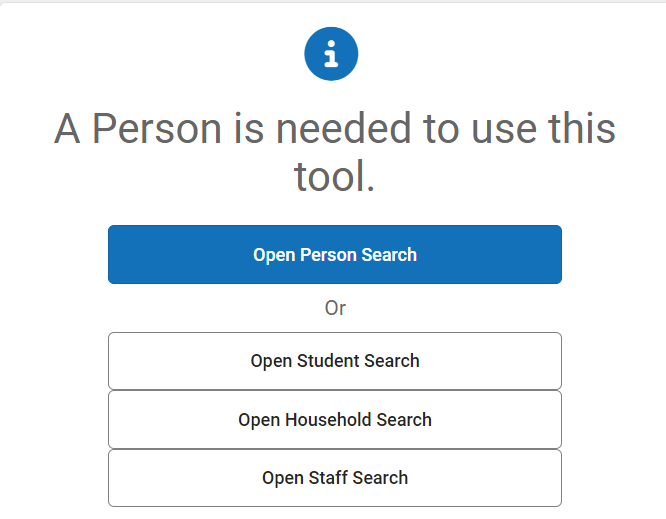
Select a Student: If a student is not selected, click Open Student Search tool to search by the student's name. Search for students using advanced searches or Ad Hoc Filters as needed. Select the student's name to open the Early Learning Program tool. If a student was already selected, the Early Learning Program tool will open automatically.
- Click New to add a new program.

- Enter the Start Date in MM/DD/YYYY format or click the calendar icon to select the date.
- Select the Setting from the dropdown list.
- 1: Home-based (child's home)
- 2: Community-based (ex. child care)
- 3: Center-based (operated by PSU)
- 4: School-based (K-12 school building)
- 5: CTE Early Childhood Preschool classroom (operated by PSU)
- 6: Exceptional Children Service Provider Location
- 7: To be determined
- Select the Enrollment Type from the list. Select all types that apply.
- 1: Exceptional Children
- 2: Exceptional Children Itinerant
- 3: Title I
- 5: Early Head Start
- 6: NC Pre-K
- 7: Childcare Subsidy
- 8: Local Government
- 9: Fee-Based
- 10: CTE Preschool
- 11: Smart Start
- 12: Private Grant
- 13: Other
- Click Save to add the program.


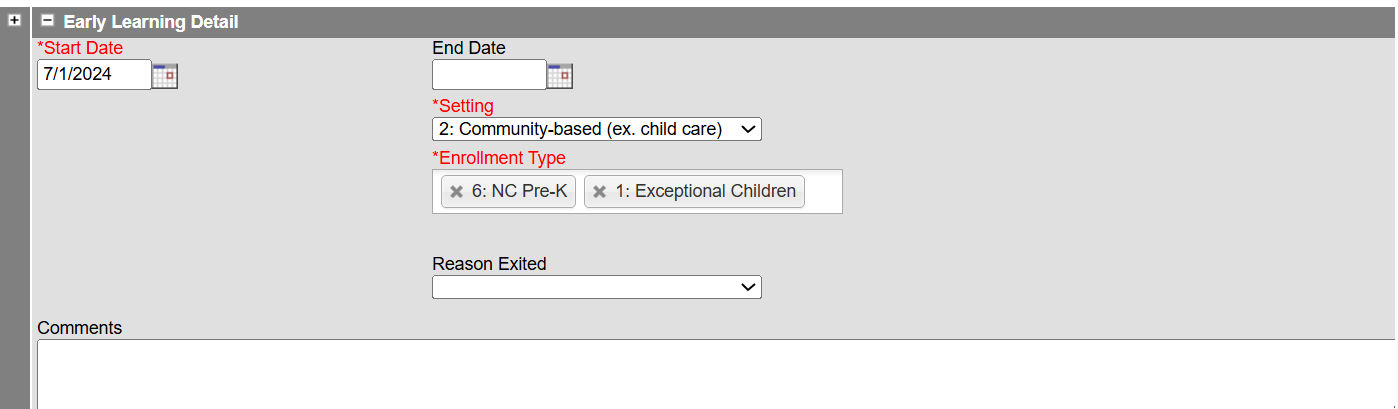
After saving the program, the program will appear in the student's Early Learning tool.

Early Learning Program Exit
Navigation: Menu > Student Information > Program Participation > Early Learning
When a student is no longer eligible for services, exit the student from the program using the following steps.
Select a Student: If a student is not selected, click Open Student Search tool to search by the student's name. Search for students using advanced searches or Ad Hoc Filters as needed. Select the student's name to open the Early Learning Program tool. If a student was already selected, the Early Learning Program tool will open automatically.
- Click the existing early learning program to open the program information.
- Enter the End Date in MM/DD/YYYY format or click the calendar icon to select the date.
- Select the Reason Exited from the dropdown list.
- 1: Withdrawal by a parent (or guardian)
- 2: Family refused services
- 3: Attempts to contact the parent and/or child were unsuccessful
- 4: Never attended
- 5: Age eligible for kindergarten
- 6: Transferred to another district or school, known to be continuing in program/service
- 7: Transferred to another district or school, not known to be continuing in program/service
- 8: Moved out of State
- 9: Not eligible for Part B
- 10: Part B eligibility not determined
- 11: No longer receiving special education
- 12: Program discontinued
- 13: Unknown reason
- 14: Died or is permanently incapacitated
- 15: Other
- Click Save to end the program.
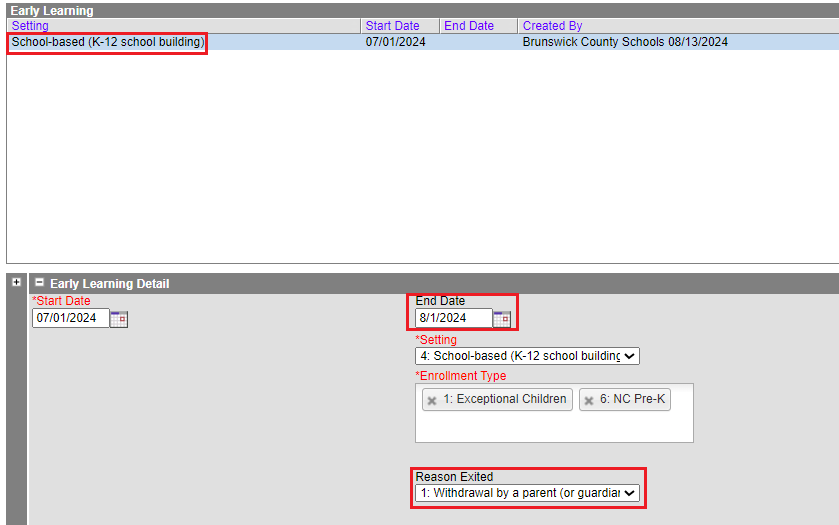
The program information will be listed in the Early Learning program tool. Click the program to see details regarding the program.

The Early Learning Program should be ended for pre-k students who will transition to kindergarten the next school year. The program would be ended by selecting an end date and choosing a "Reason Exited".
It is our professional obligation to ensure that preschool data is current, valid, and reliable to best support and advocate for our state preschool/prekindergarten programs. This will require consistency in the way we create student records in the Student Information System (SIS).
To support consistency in the data, DPI has created two new course codes for Preschool.
- 99329P0 - Activity Period/Home Room
- 99359P0 - Non-Reporting
Beginning in the 2023-2024 schools year, each preschool/prekindergarten teacher should be assigned a Home Room course code (99329P0 - Activity Period/Home Room) and their students should be enrolled in their teacher's Home Room course code.
| Course Code | Course Name | Suggested Use |
|---|---|---|
10382P0 | English As A Secd Lang Pre-K ESL | ESL Course |
96132P0 | Pre-K Classroom Pre-K Misc | Scheduling time of “core” classroom courses |
99322P0 | Pre-K Classroom Pre-k Misc | Scheduling time of “core” classroom courses |
99329P0 | Activity Period/Home Room | All Pre-K students should be enrolled in 99329P0 with the exception noted below.* |
99359P0 | Pre-K Classroom | Scheduling time of Specials (ex. Music, Art, PE, etc.) |
*NOTE: To ensure accurate Teaching Strategies GOLD and Finch Literacy Screener rostering, children receiving EC itinerant services in community-based settings should not be assigned a 99329P0 Activity Period/Home Room course code.
Eventually data integration with vendors to automatically roster teachers and students will be possible once the use of these new course codes is in place and used consistently for all public school preschool/prekindergarten classrooms.
Pre-K students are not included in Average Daily Membership calculations. Students admitted and registered in the SIS as MST1 in grade level pre-K are reported on the Principal's Monthly Report in a manner that excludes them from any calculations and totals. Students in grade levels IT, PR, PK will also be MST1 and will not be included in Average Daily Membership. The totals for IT, PR, and PK will be grouped under the pre-K totals on the PMR.
Public Schools must track daily attendance for all enrolled pre-K students. These do not include children enrolled in "itinerant" or “service provider location” programs (IEP settings). Pre-K students may have various attendance plans based on the program types they are enrolled in. Please note that the 10-day and no-show attendance rules do not apply to Pre-K students.
Head Start Programs
If the PSU is the Head Start grantee or contracts with a Head Start grantee to directly provide the early childhood classroom setting, the enrolled pre-K students must be included in attendance reporting. The Head Start Collaboration Office can share a PSU Head Start grantee list as needed. PSUs that house Head Start classrooms through facilities agreements, but do not provide direct early childhood education services, must enroll the pre-K students in the SIS and identify the program demographics only.
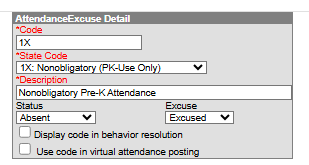
Use the 1X — Nonobligatory Attendance Code
On days students Are Not expected to attend their pre-K program, use attendance code 1X: Nonobligatory. This code is available in all SIS instances as an Excused Absence code. The SIS will automatically calculate the attendance information necessary for state and Federal reporting.
Discipline reporting for pre-K students works the same way as it does for students in grades K-13 and must be submitted to NCDPI in the SIS by the required timeframes. Please refer to the preschool section of the North Carolina Discipline Data Reporting Procedures guide for additional information.
Please direct programmatic questions to the appropriate program consultant (e.g., Preschool Exceptional Children, Head Start or Preschool Title I).

