
Students that demonstrate a deep understanding of the course content without course enrollment or seat time, may earn credit for high school. The steps below provide guidance on adding the CDM credit to the transcript tool.
Navigation: Select Student > Student Information > General > Transcripts
- Select New Details.
- Fill in the School Information section. (School Year, School Name, School Number, District Number, Grade, NCES Grade)
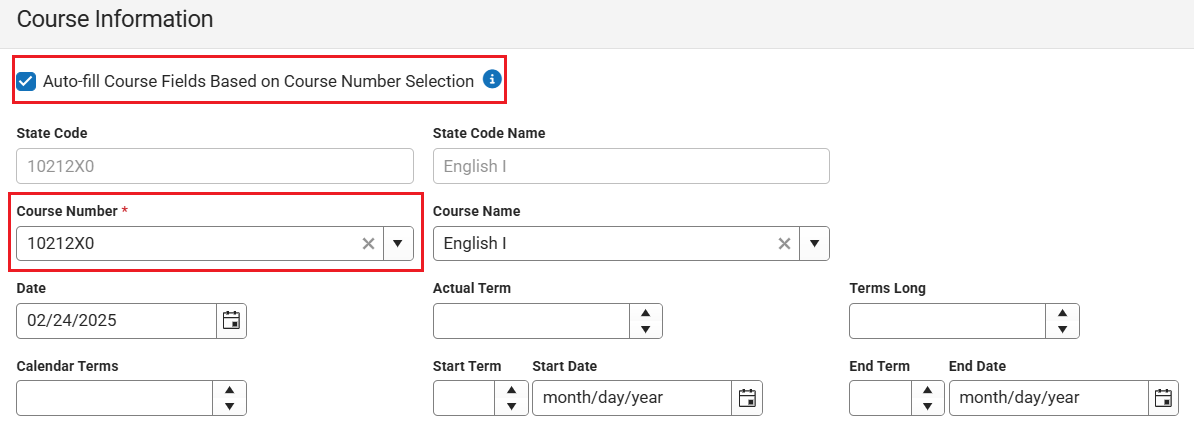
- Enter the course number. The auto-fill course fields based on course number selection should be checked for other fields to update.
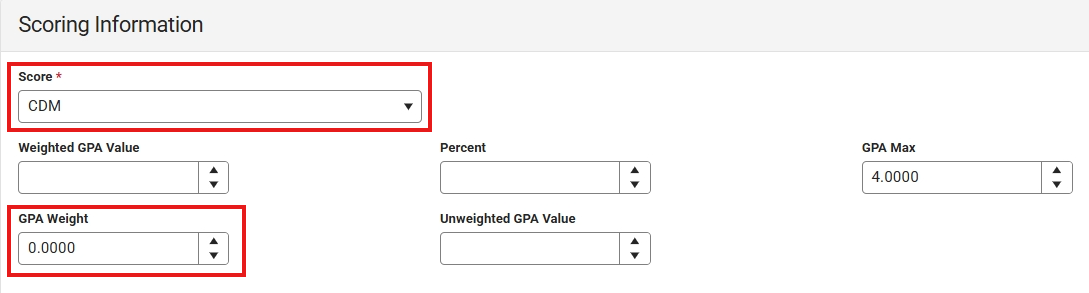
- Choose CDM from the Score dropdown and change the GPA Weight to 0.
- Enter the Credits Earned. The credits attempted and credit type should populate based on the course number entered in step 3.

- Click Save.
The CDM credit will be listed in the transcript detail and print on the transcript as CDM. 

